Email Workflows That Sell While You Sleep: The Complete Guide to Building High-Impact Automated Flows
Industry: Marketing
If your email workflows are driving less than 70% of your total email revenue, you’re leaving substantial money on the table. This isn’t a minor optimisation opportunity; it’s a fundamental gap in your marketing automation strategy that’s costing you conversions every single day.
Automated email workflows meet customers precisely when they’re most receptive. When someone browses a product, adds an item to their cart, or subscribes to your list, they’re sending you a clear signal about their interests and intent. Your workflows represent your chance to respond intelligently at scale, without burdening your team with manual email sends for every single interaction.
Here’s what makes workflows so powerful: You set them up once, and they run continuously in the background, working around the clock to nurture leads, recover abandoned sales, and transform casual interest into committed action. Unlike one-off email campaigns that stop after you hit send, automated workflows keep generating results month after month with minimal ongoing maintenance.
At WEBSIGH, we’ve built and optimised email workflows for hundreds of clients across diverse industries. The businesses that excel at email automation share one common trait: they treat workflows as a strategic revenue channel, not just a “nice to have” marketing tactic. Consequently, their automated emails consistently outperform broadcast campaigns in both engagement and conversion rates.
In this comprehensive guide, we’ll break down exactly how to build email flows that don’t just look impressive in your email service provider (ESP) dashboard—they drive measurable, sustainable revenue growth for your business.
Understanding Email Workflows: The Foundation of Marketing Automation
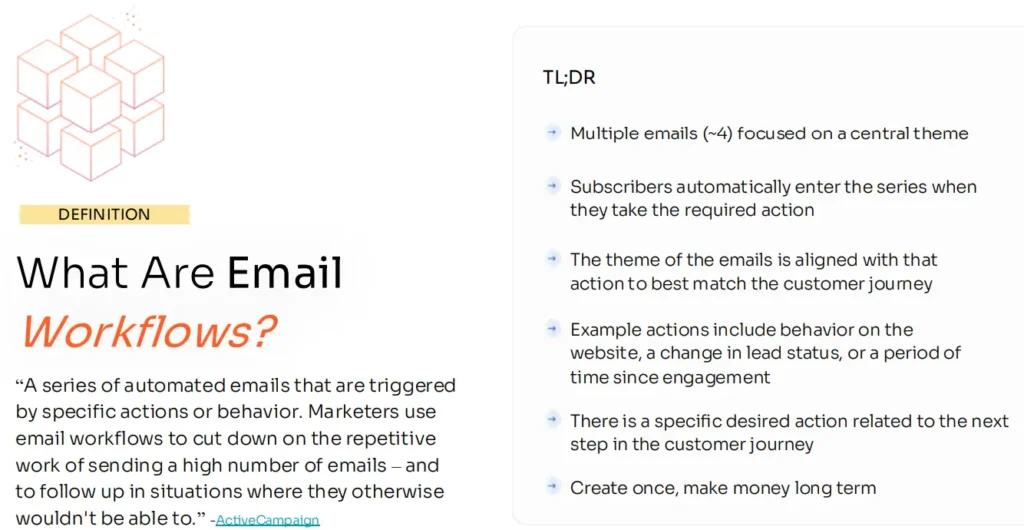
At its core, an email workflow is a strategically designed series of automated emails triggered by specific user behaviours or profile characteristics. These might include signing up for your email list, abandoning a shopping cart, making a purchase, or becoming inactive after a period of engagement. Each workflow is carefully designed to align with where someone sits in their customer journey, delivering relevant messages that guide them toward the next logical step.
How Email Workflows Differ from Traditional Campaigns
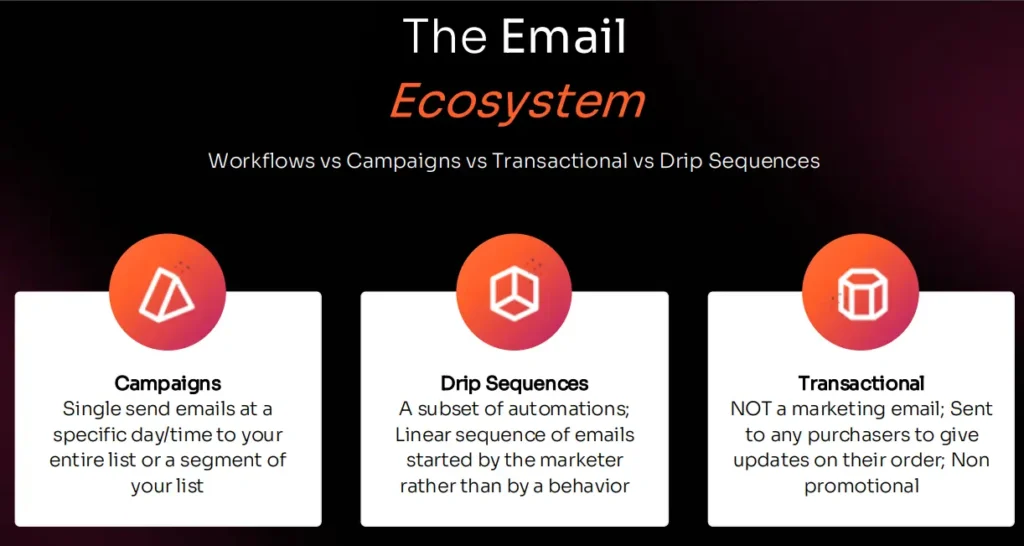
Traditional email campaigns operate on a broadcast model; you craft a message, select recipients, and send it to everyone simultaneously, regardless of their individual circumstances or timing preferences. Workflows operate fundamentally differently. They’re part of a sophisticated drip system that delivers a carefully orchestrated sequence of emails at intervals you define (daily, weekly, monthly, or triggered by specific actions).
Key distinctions:
Campaigns = One message, sent once, to everyone at the same time
Workflows = Multiple messages, sent strategically, to individuals when they take specific actions
Moreover, each workflow email is personalised and goal-oriented. The moment a contact meets your predetermined conditions, they automatically enter the workflow and progress through it based on delays, filters, and rules you configured in advance. This level of behavioural targeting is impossible with traditional broadcast campaigns.
Why Workflows Become Your Most Profitable Email Channel
This is where automated email marketing transforms from a nice efficiency gain into a genuine revenue growth engine. When executed properly, workflows systematically convert casual interest into paying customers without requiring constant manual intervention from your team.
Unlike campaigns that stop generating results the moment you send them, workflows continue running indefinitely. Set them up once, and they keep working day after day, month after month, automatically responding to customer behaviours and driving conversions. That’s what makes email automation such a scalable and often underutilised channel for predictable revenue generation.
The Five Essential Email Workflow Types Every Business Needs
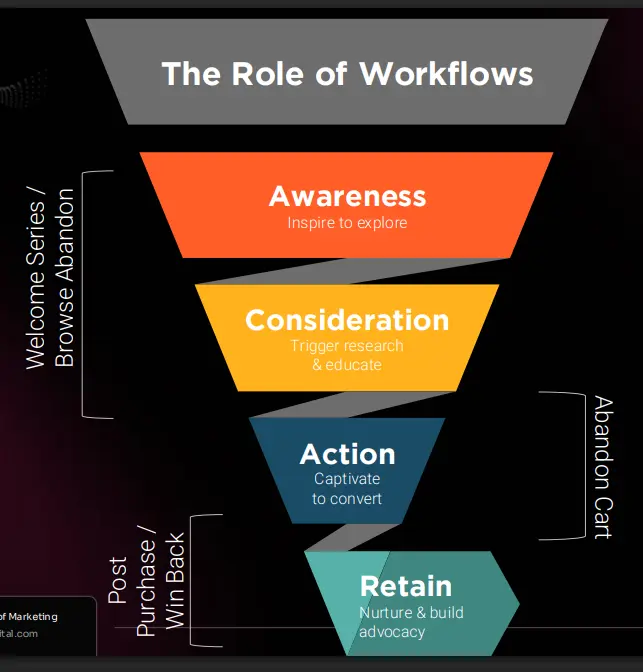
Not all email workflows serve the same purpose. The most effective automation strategies align specific workflow types with distinct moments in your customer journey. Here are the five must-have workflows that drive the majority of automation revenue:
1. Welcome Series: Making Powerful First Impressions
Trigger: Someone subscribes to your email list through any opt-in form, lead magnet download, or account creation.
Primary Goal: Introduce your brand, set expectations, deliver on your promise, and guide new subscribers toward their first meaningful action (whether that’s making a purchase, booking a call, or engaging with key content).
Why It Matters: Your welcome series sets the tone for your entire subscriber relationship. Research consistently shows that welcome emails generate 3-5x higher open rates and click rates compared to standard promotional emails. People are most engaged immediately after subscribing, so capitalise on that momentum.
Recommended Sequence:
Email 1 (Immediate): Deliver your lead magnet or promised content, introduce yourself/your brand, and set expectations for future emails.
Email 2 (1-2 days later): Share your origin story or mission, establish credibility and trust, and provide additional value.
Email 3 (3-4 days later): Showcase your most popular product/service/content, include social proof (testimonials, case studies), and present your first soft offer.
Email 4 (5-7 days later): Make a stronger call-to-action, offer a new subscriber incentive if appropriate, and guide them toward conversion.
2. Browse Abandonment: Capturing Interest Before It Fades
Trigger: A visitor views specific products or high-intent pages on your website but leaves without taking action (adding to cart, filling out a form, etc.).
Primary Goal: Remind them what captured their interest, address potential objections or questions, and keep the conversation alive while their intent is still fresh.
Why It Matters: Browse abandonment sits at the critical junction between casual interest and purchase consideration. These visitors demonstrated clear intent by viewing specific products or services. A well-timed reminder can be the nudge they need to move forward. Furthermore, browse abandonment emails typically convert 2-3x higher than generic promotional campaigns.
Recommended Sequence:
Email 1 (2-4 hours later): Showcase the specific product(s) they viewed, highlight key benefits and differentiators, and include related products they might also like.
Email 2 (24 hours later): Address common objections (price, features, shipping, returns), provide additional social proof, and share educational content about the product category.
Email 3 (2-3 days later): Create urgency with limited-time offers or scarcity messaging, feature customer testimonials, and present a clear path to purchase.
3. Abandoned Cart Recovery: Rescuing Lost Revenue
Trigger: A shopper adds one or more items to their shopping cart but exits your site without completing the checkout process.
Primary Goal: Remind them of their pending purchase, reduce friction or objections preventing conversion, and incentivise them to complete their transaction.
Why It Matters: Shopping cart abandonment rates average 60-80% across e-commerce sites. This represents enormous revenue potential; these are customers who were literally seconds away from purchasing. Abandoned cart workflows typically generate 10-30% of e-commerce email revenue despite being triggered by a relatively small percentage of site visitors. They’re among the highest ROI workflows you can implement.
Recommended Sequence:
Email 1 (1 hour later): Simple reminder featuring cart contents with product images, streamlined checkout link, emphasising security and easy returns.
Email 2 (24 hours later): Address common purchase objections, highlight free shipping or other benefits, and include urgency elements (“items reserved for 48 hours”).
Email 3 (48 hours later): Offer a discount or incentive if appropriate for your business model, create final urgency (“cart expires in 24 hours”), showcase testimonials from satisfied customers.
Email 4 (5-7 days later – optional): Final outreach before permanent cart expiration, survey to understand what prevented purchase, invite them to browse related products.
Essential Elements That Make Email Workflows Effective
Every successful email workflow is constructed from several key components. Think of these as your essential toolkit for delivering precisely the right message to the right person at exactly the right moment:
1. Triggers: Starting the Customer Journey
Triggers are the specific actions or conditions that initiate a workflow and enroll someone into the email sequence. Without proper trigger configuration, your carefully crafted workflow will never send. Common trigger types include:
Behavioural triggers:
- Form submission or email list subscription
- Product page views (browse abandonment)
- Cart additions without purchase (cart abandonment)
- Purchase completion
- Email engagement (clicks on specific links)
- Inactivity for a defined time period
Profile-based triggers:
- Birthday or anniversary date
- Subscription renewal approaching
- Account upgrade or downgrade
- Geographic location change
- Profile field updates
2. Profile Filters: Controlling Who Enters
Filters are conditional rules that determine which contacts can enter a specific workflow, even if they meet the trigger criteria. This prevents inappropriate messaging and ensures relevance. For example:
- Only include first-time buyers in the welcome purchase sequence
- Exclude customers who purchased within the last 30 days from win-back campaigns
- Limit to subscribers who have shown interest in specific product categories
- Filter by subscription tier or customer value segment
- Exclude contacts already in other active workflows
3. Delays: Timing Your Messages Strategically
Delays control the time intervals between emails in your sequence. Strategic timing dramatically impacts workflow performance. Considerations include:
Time-based delays: Fixed periods (2 hours, 1 day, 3 days, 1 week) between emails
Smart delays: Time of day optimisation (never send at 2 AM in the recipient’s timezone)
Behavioural delays: Wait until a specific action occurs or doesn’t occur before proceeding
Sales cycle alignment: Mirror your typical customer decision timeline, don’t rush high-consideration purchases
4. Conditional Splits: Creating Personalised Paths
Conditional splits create branches in your workflow based on specific criteria, allowing you to personalise the experience based on user characteristics or behaviours:
Engagement-based splits:
- Did they open the previous email?
- Did they click any links?
- Which specific link did they click?
Value-based splits:
- Cart value thresholds (high-value vs. low-value abandoned carts)
- Customer lifetime value segments
- Product category or type purchased
Profile-based splits:
- New customer vs. returning customer
- Geographic location
- Subscription tier or membership level
- Previous purchase history
5. Exit Conditions: Knowing When to Stop
Exit conditions automatically remove contacts from a workflow when they’ve completed the desired action or no longer need to receive additional emails. This prevents annoying customers with irrelevant messages and improves overall workflow efficiency:
- Purchase completed (for cart abandonment workflows)
- Engagement occurred (for win-back campaigns)
- Time limit reached (cart expired after 7 days)
- Unsubscribed or opted out
- Moved to a different customer segment
Combining these elements strategically makes your automations feel genuinely personalised rather than robotic, significantly increasing customer engagement and driving superior performance outcomes.
Measuring Success: The Metrics That Actually Matter
Tracking reliable metrics is essential for determining whether your email workflows are genuinely effective or simply generating email activity without business impact. Leveraging automation to reduce manual work is valuable, but the real ROI emerges when you can systematically track and continuously improve performance.
Core Workflow Metrics to Monitor
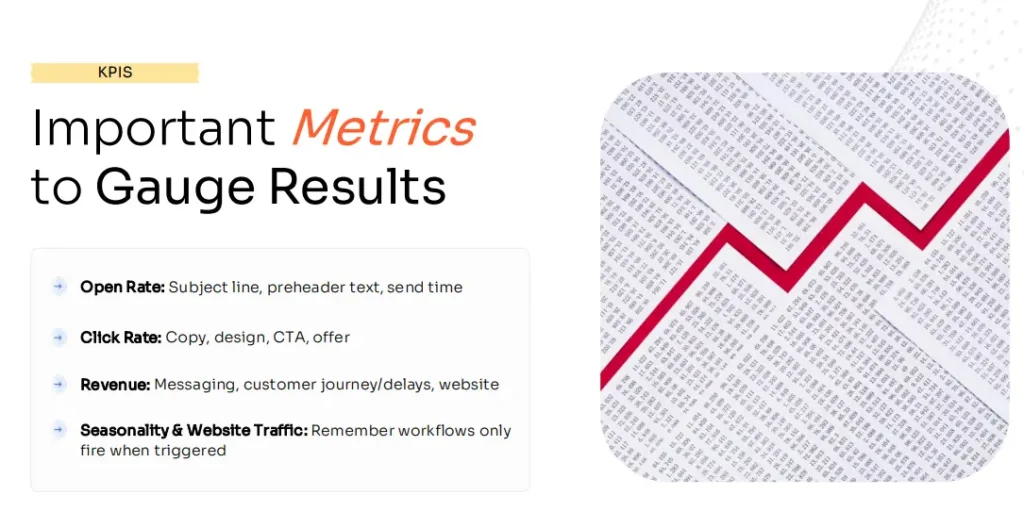
1. Open Rate: Are Your Subject Lines Working?
Open rate represents the percentage of recipients who open your emails. More specifically, it reveals whether your subject lines, sender names, and preview text are compelling enough to capture attention in crowded inboxes.
Benchmarks:
- Welcome series: 40-50%
- Abandoned cart: 40-45%
- Browse abandonment: 35-40%
- Post-purchase: 50-60%
- Win-back: 15-25%
Improvement tactics: If your open rates fall below these benchmarks, experiment with A/B testing different subject line approaches, sending times, or preview text variations to identify what resonates with your specific audience.
2. Click-Through Rate: Are Recipients Taking Action?
A strong open rate means nothing without subsequent clicks. Click-through rate measures the percentage of email recipients who click on at least one link in your message, indicating genuine interest and engagement.
Benchmarks:
- Welcome series: 5-8%
- Abandoned cart: 8-12%
- Browse abandonment: 3-5%
- Post-purchase: 4-6%
- Win-back: 1-3%
Improvement tactics: Low click rates suggest problems with your call-to-action clarity, email layout and design, or how obviously you’re guiding users toward the next step. Test more prominent CTAs, simplified designs, and clearer value propositions.
3. Revenue Per Workflow: The Ultimate Performance Indicator
Revenue directly attributed to each workflow represents your ultimate KPI. This metric reveals whether your workflows are actually driving business results or just creating email activity.
Analysis approach: If revenue per workflow is lagging expectations, systematically examine the complete customer experience:
- Message relevance and timing
- Offer strength and value proposition
- Landing page experience after clicking
- Checkout friction points
- Product availability and pricing
4. Workflow Volume: Are Enough People Entering?
Remember, automations only trigger when users take qualifying actions. If insufficient contacts are entering your workflows, you likely have an upstream problem unrelated to email performance itself.
Common causes of low volume:
- Inadequate website traffic
- Poor opt-in conversion rates
- Overly restrictive filter conditions
- Broken tracking or trigger implementation
- Segmentation excluding too many people
5. Engagement Drop-Off: Where Are People Losing Interest?
Monitor precisely where in your sequence users stop engaging. If most recipients bounce after email two, your workflow might be too long, your messaging might be repetitive, or you might be failing to deliver increasing value with each subsequent email.
Optimisation approach: Test shorter sequences, vary your content and offers across emails, and ensure each message provides distinct value rather than repeating the same message in different words.
Advanced Metrics for Mature Workflow Programs
Conversion attribution: Which workflows contribute most to first purchases versus repeat purchases?
Time-to-conversion: How long between workflow entry and eventual purchase?
Unsubscribe rate per workflow: Are specific workflows annoying recipients?
Deliverability metrics: Are workflow emails reaching inboxes or hitting spam folders?
Don’t just set workflows and forget about them. Instead, use these performance signals to continuously refine your automation strategy over time, ensuring your workflows keep earning revenue while you focus on other business priorities.
Best Practices for High-Performing Email Workflows
Building effective workflows requires more than just technical configuration. These proven best practices separate average automation programs from exceptional ones that drive substantial revenue:
1. Start With Your Customer Journey, Not Your ESP Features
Many businesses make the mistake of building workflows around what their email service provider makes easy rather than what their customers actually need. Instead, map your actual customer journey first:
- What questions do prospects have at each stage?
- What objections prevent them from moving forward?
- What information do they need to make confident decisions?
- Where do they typically get stuck or drop off?
Then design workflows that address these real customer needs and experiences.
2. Personalise Beyond First Name Tokens
Dynamic content based on browsing history, purchase patterns, and preferences dramatically outperforms generic messages that only include a subscriber’s first name. Leverage your ESP’s personalisation capabilities to customise:
- Product recommendations based on browsing history
- Content suggestions aligned with their interests
- Offers relevant to their customer segment
- Messaging that reflects their stage in the buying journey
3. Test Aggressively and Systematically
Your first workflow version will never be your best. Implement a systematic testing program that evaluates:
- Subject line variations
- Send time optimisation
- Email length and format
- CTA placement and copy
- Sequence length and delay timing
- Offer types and incentive levels
Test one variable at a time, and implement winners before testing the next element.
4. Maintain Brand Consistency Across All Touchpoints
Your automated emails should look and sound like they come from the same brand as your website, ads, and manual campaigns. Ensure consistency in:
- Visual design and colour schemes
- Tone of voice and writing style
- Logo and header treatment
- Footer information and legal requirements
5. Make Mobile Optimisation Non-Negotiable
Over 60% of emails are opened on mobile devices. If your workflows aren’t mobile-optimised, you’re alienating the majority of your audience. Essential mobile requirements:
- Responsive email templates that adapt to screen size
- Large, finger-friendly CTA buttons
- Concise subject lines (under 40 characters)
- Single column layouts for easy scrolling
- Minimal text that gets to the point quickly
6. Implement Frequency Caps and Exclusions
Prevent email fatigue by implementing smart frequency management:
- Maximum emails per week across all workflows and campaigns
- Exclusions preventing people from being in multiple workflows simultaneously
- Suppression lists for recent purchasers, unengaged subscribers, etc.
- Priority systems that pause lower-priority workflows when higher-priority ones are active
7. Clean Your Lists Regularly
Email deliverability depends heavily on engagement rates. Regularly remove or suppress:
- Hard bounces (invalid email addresses)
- Contacts who haven’t engaged in 6-12 months
- Spam complaints
- Repeated soft bounces
- Obvious fake or test email addresses
8. Comply With Email Regulations
Ensure all workflows comply with CAN-SPAM, GDPR, and other relevant email regulations:
- Clear, functional unsubscribe links in every email
- Accurate sender information
- Physical mailing address in footer
- Proper consent documentation for subscribers
- Honour unsubscribe requests within required timeframes
9. Create Workflow Documentation
Document your workflow strategy, structure, and performance for team continuity:
- Workflow objectives and target audiences
- Trigger and filter logic
- Email sequence and timing
- Performance benchmarks and goals
- Testing schedule and methodology
- Optimization history and learnings
10. Review and Refresh Content Quarterly
Even automated emails need periodic updates to remain relevant and effective:
- Update seasonal references and current year mentions
- Refresh screenshots and product images
- Revise offers and incentives based on performance
- Incorporate new social proof and testimonials
- Adjust messaging based on market changes
Common Email Workflow Mistakes That Kill Performance
Even experienced email marketers frequently make critical errors that dramatically undermine workflow performance. Avoid these common pitfalls:
❌ Sending Too Many Emails Too Quickly: Bombarding subscribers with daily emails in your workflows creates fatigue and drives unsubscribes. Space emails strategically based on your sales cycle and customer patience.
❌ Generic, Impersonal Content: Automated doesn’t mean robotic. Workflows that sound like they were written by bots rather than humans fail to build genuine connection and trust.
❌ Unclear or Weak CTAs: Every email should have one primary call-to-action that’s obvious and compelling. Multiple competing CTAs confuse recipients and reduce conversion.
❌ Ignoring Non-Openers: If someone doesn’t open the first email in your sequence, sending the second email with the same subject line wastes an opportunity. Test subject line variations or change your approach.
❌ No Exit Strategy: Keeping people in workflows indefinitely after they’ve converted or clearly aren’t interested wastes resources and annoys customers.
❌ Poor Landing Page Experience: Driving clicks to slow, confusing, or irrelevant landing pages sabotages even the best email workflows. Ensure your landing pages deliver on the email’s promise.
❌ Setting and Forgetting: Workflows aren’t truly “set it and forget it”—they require ongoing monitoring, testing, and optimisation to maintain peak performance.
❌ Inconsistent Branding: Workflows that look different from your website and other marketing materials create confusion about whether emails are legitimate.
Advanced Workflow Strategies for Maximum Revenue
Once you’ve mastered the five core workflows, these advanced strategies can drive additional revenue growth:
Dynamic Product Recommendations
Integrate your ESP with your product catalogue to automatically feature the most relevant products based on:
- Browsing history and viewed items
- Purchase history and complementary products
- Best sellers in viewed categories
- Inventory levels and clearance items
- Personalised recommendations based on collaborative filtering
Predictive Send Time Optimisation
Use machine learning to automatically send each email at the optimal time for each subscriber based on their historical engagement patterns, dramatically improving open and click rates.
Progressive Profiling Workflows
Gradually collect additional subscriber information across multiple interactions rather than requiring lengthy forms upfront. Each workflow email can request one additional data point while providing value in return.
Loyalty and Milestone Workflows
Automatically celebrate customer milestones and reward loyalty:
- First purchase anniversary
- Spending tier achievements
- Product usage milestones
- Birthday and personal celebrations
- Referral achievements
Cross-Channel Workflow Integration
Extend your email workflows to include:
- SMS messages for time-sensitive cart abandonment
- Browser push notifications for re-engagement
- Retargeting ads for workflow participants
- Direct mail for high-value abandoned carts
Getting Started: Your Email Workflow Implementation Roadmap
Ready to transform your email marketing through automation? Follow this proven implementation sequence:
Phase 1: Foundation (Weeks 1-4)
Start with your welcome series—it’s the highest-volume workflow and establishes your relationship with every subscriber:
- Map your ideal welcome experience (3-4 emails)
- Write compelling, brand-consistent email copy
- Design mobile-responsive email templates
- Configure trigger and filter logic
- Set up proper tracking and analytics
- Test thoroughly before launch
Expected results: 40-50% open rates, 5-8% click rates, 5-10% of email revenue
Phase 2: Quick Wins (Weeks 5-8)
Add abandoned cart recovery—typically the highest ROI workflow:
- Design 3-4 email cart recovery sequence
- Integrate with e-commerce platform
- Include dynamic cart content and images
- Test discount threshold if applicable
- Monitor conversion rates and revenue
Expected results: 10-30% cart recovery rate, 20-40% of email revenue
Phase 3: Expansion (Weeks 9-12)
Build out browse abandonment and post-purchase workflows:
- Configure browse tracking on key pages
- Create browse reminder email sequence
- Design post-purchase onboarding series
- Implement cross-sell recommendation logic
- Test and optimise timing and content
Expected results: An Additional 15-25% of email revenue
Phase 4: Optimisation (Month 4+)
Add win-back campaigns and continuously optimise all workflows:
- Define engagement thresholds for win-back
- Create compelling re-engagement series
- Implement systematic A/B testing program
- Review and refresh existing workflows
- Expand based on performance insights
Expected results: Total workflow revenue reaching 60-80% of email program
Transform Your Email Marketing with Professional Workflow Strategy
Email workflows represent one of the highest-ROI marketing investments you can make. Once properly configured, they generate consistent revenue month after month with minimal ongoing effort required. However, building truly effective workflows requires strategic thinking beyond basic email marketing tactics.
The difference between workflows that generate modest results and those that become primary revenue drivers lies in strategic design that genuinely reflects your customer journey, technical implementation that functions flawlessly, and continuous optimisation based on performance data.
Many businesses struggle to implement effective workflows because they lack either the technical expertise to configure complex automation logic or the strategic experience to design customer-centric sequences that actually convert. That’s where partnering with experienced automation specialists can dramatically accelerate your results.
Let WEBSIGH Build Your Revenue-Generating Email Workflows
WEBSIGH’s Email Automation Services Include:
✓ Comprehensive customer journey mapping and workflow strategy
✓ Complete workflow design and email copywriting
✓ Technical configuration in your ESP platform
✓ Mobile-responsive email template design
✓ Advanced segmentation and personalisation setup
✓ Integration with your e-commerce or CRM platform
✓ Systematic A/B testing and optimisation programs
✓ Ongoing performance monitoring and refinement
Start Generating Revenue on Autopilot:
📧 Email: info@websigh.com
📞 Phone: +91 (700) 880-7871
🔗 Get Your Free Email Workflow Audit: Fill the form below, and we will get back to you.
Don’t let a poor automation strategy leave money on the table. The businesses maximising email revenue in 2026 are those treating workflows as strategic assets that work 24/7 to nurture relationships and drive conversions.
Let WEBSIGH help you build workflows that transform your email program into a consistent revenue engine.
The technology that we use to support you
Ready to reduce your technology cost?

See More Blogs



Let's Make Something Impactful
Call us at: 700-880-7871
- Client-oriented
- Independent
- Competent
- Results-driven
- Problem-solving
- Transparent